Tuesday, August 24, 2010
Animation more sorted
That thing I said yesterday about the exporter only exporting a single pose at a time? Solved. Actually took much less work than I expected, and now I can export an entire animated action in a single file. Might have to tweak it later after I tweak how the engine handles animation of course, but that's the nature of the work. It's an iterative process.

Monday, August 23, 2010
Animation sorted
I recently started to spend time on my engine again, and have finally solved the issues with importing geometry and animations from Blender. There were some problems before that I had not noticed because I had not tested enough, but things seem to be running quite well now. I've also cleaned up the code a bit, and improved the export scripts, making them more user-friendly. The animation export script currently only exports single rig poses though, so the next step will be to export an entire "movement" in one go. After that I think I'll look at graphics again, try to throw in some fancy effects.
Current progress:
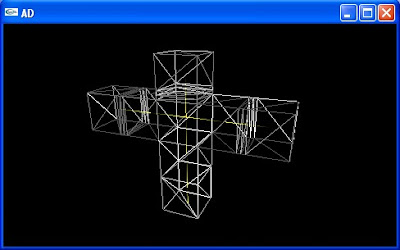 Bind pose
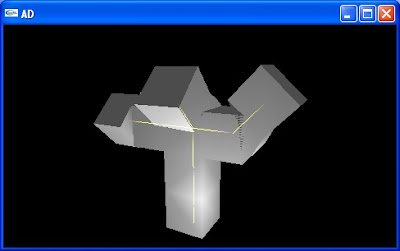 Posed bones. It may not be obvious, but this is supposed to happen.
Current progress:
 Bind pose
 Posed bones. It may not be obvious, but this is supposed to happen.
Wednesday, June 2, 2010
Quick update - Rolling Bones and Crimson Fists
So I've made some progress in my game engine. I've gotten the animation to a point that I can live with for the time being, though I will be changing some elements later. The problem now is getting the data. I considered trying to use existing formats, but for now I'm sticking to my own as I cannot find an existing format (supported by Blender) that I like. Instead I'm writing tools for exporting from Blender. I've written an exporter for my mesh format, though it doesn't export edges or vertex weights yet (coming soon!). I've written an exporter for the rig, but I don't understand what Blender is doing with it's matrices - the bones seem to be rolling or something, and my rigs are not exporting correctly. Anyway, I'm shelving my engine for a short time while I concentrate on Java, which I need for work. Hopefully I'll be able to pick it up again soon.
In the mean time, here a couple of Crimson Fists. I had some trouble with the transfers, but otherwise I'm happy with how they turned out. Their armor is much lighter than normal for Crimson Fists, but I prefer it as it looks better under normal room lighting. I settled on Crimson fists because I like blue for Space Marines, but Ultramarines are pretty much the standard, so I wanted something different (some people always have to be different...). I considered making my own chapter, but I couldn't think of anything special and I like the Crimson Fists colour scheme and backstory.
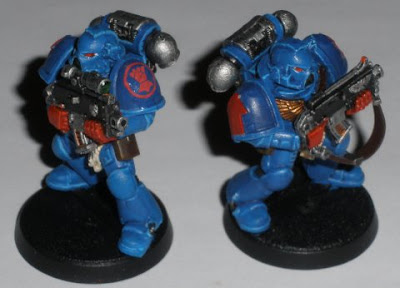
In the mean time, here a couple of Crimson Fists. I had some trouble with the transfers, but otherwise I'm happy with how they turned out. Their armor is much lighter than normal for Crimson Fists, but I prefer it as it looks better under normal room lighting. I settled on Crimson fists because I like blue for Space Marines, but Ultramarines are pretty much the standard, so I wanted something different (some people always have to be different...). I considered making my own chapter, but I couldn't think of anything special and I like the Crimson Fists colour scheme and backstory.

Tuesday, March 30, 2010
Lights! Camera! WAAAAGGGHHHH!
I have been spending most of my free time on Warhammer, mainly reading and painting (I've found a few people mildly interested in playing, but no-one seems to have the time). I've made a start on some custom models, which I think will be pretty unique, and I'll tell you why.
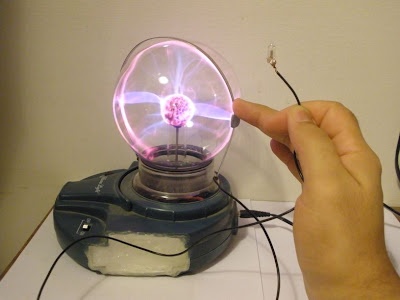
First let me tell you about something I don't understand, but that's interesting nonetheless: plasma balls are scary. Take a power testing screwdriver and hold it near a plasma ball. It doesn't even need to touch it to light up. What's more, if you open the screwdriver and remove the bulb, then just hold it near the plasma ball it will light up - that's all it takes. Hell, if you put it close enough or touching the plasma ball you won't even need to touch the bulb (though touching the bulb seems to provide an earth and allow a better current flow). If you place a small piece of metal such as a coin (I found the metal spring from an old pair of headphones works well) on the surface of the plasma bulb and connect it via a cable to the bulb, it will light up at a distance (if you touch the bulb it will be even brighter).
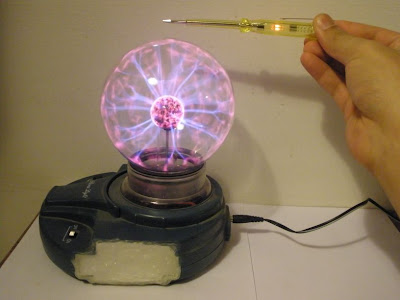 Holding the screwdriver close to the plasma ball is enough to light it (don't ask why the sides of the plasma ball have been cut off).
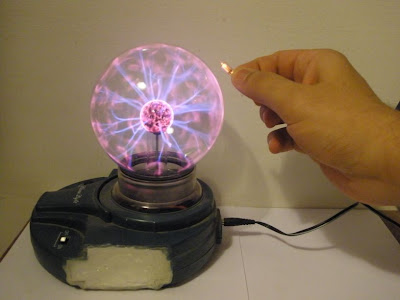 The bulb from inside the screwdriver also lights when held near.
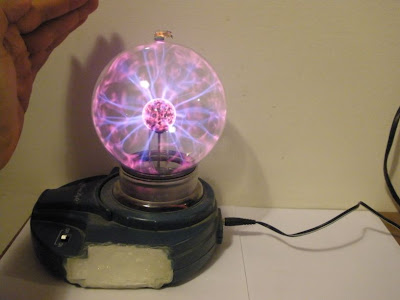 The bulb on it's own. It isn't actually touching the plasma ball, but it does need to be very close.
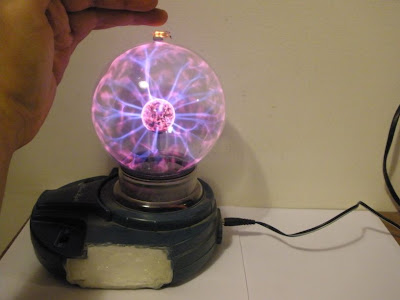 Just holding your hand close is enough to brighten it.
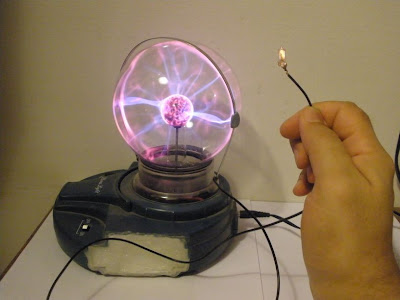 Connecting the bulb to the plasma ball using a simple cable and the spring from an old pair of headphones.
 "Stealing" the current: the bulb no longer lights up.
Now the really important thing about all this is that you have a relatively small bulb that lights up when connected to it's power source by a SINGLE cable. Why is this important? Because it means we can install the bulb in a model and we don't need to connect the model with two cables. If done right we only need to place it on a metal surface that is connected to the plasma ball, allowing us to pick it up move it around freely without any annoying cables, and it will still light up! I've already installed some bulbs in a couple of models:
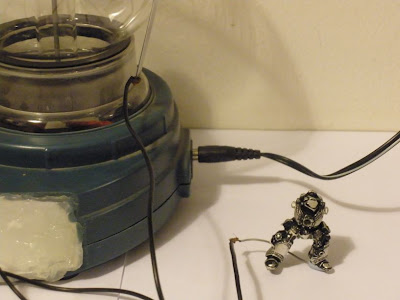 A Grey Knight Terminator (with a failed undercoat).
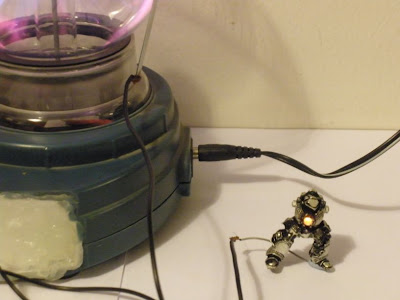 When connected to the plasma ball by a single cable (through his leg), it lights up!
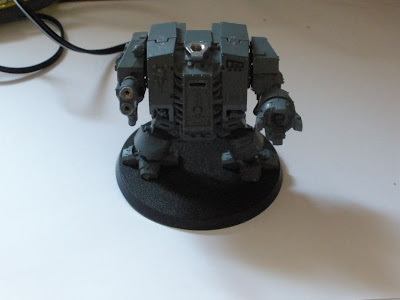 A Dreadnought (that will eventually be a Grey Knight Dreadnought) with 5 bulbs.
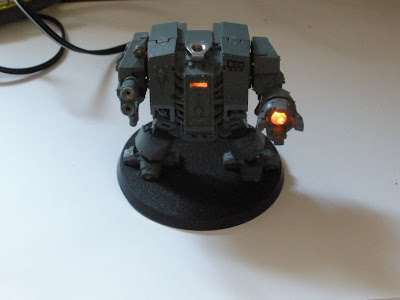 It's connected to the plasma ball ball by a single cable through the leg.
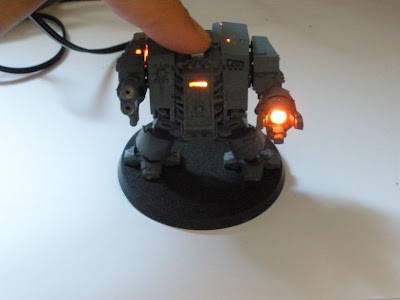 The metal nut is there so you can touch it to brighten the bulbs further.
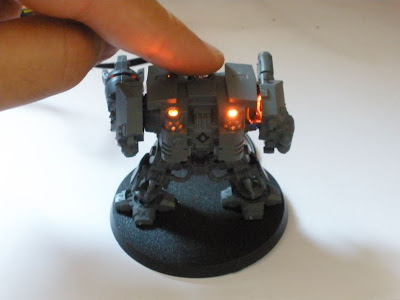 The view from behind.
Now there is one more thing you can do here (and probably more that I haven't thought of yet), though it's not as impressive and actually far less reliable. When you place a piece of metal on the plasma ball, sparks (or an arc I suppose) will jump to skin or metal held very close - if you're not careful you can end up with an extremely small yet momentarily quite painful burn on your fingers. Allowing an arc to jump to your fingers for about half a second will produce a tiny visible burn (and the small of burnt flesh) without causing any pain, but longer than that and it could hurt. I once burnt a mark into my fingernail by accident, that was rather painfull and the mark was visible until it grew out.
You can get a "captive spark" to jump on a model, but it's tricky to do and the spark is very small, and you need to touch the model to complete the circuit or else it just won't jump. Also you cannot mix sparks and bulbs on a single model, not with any degree of reliability anyway, as my Dreadnought taught me - the messy holes in his Multi Melta are from a failed attempt to get a spark to jump between the barrels. I actually got the spark to jump on occasion, but the bulbs wouldn't light unless the spark jumped. If I wired it up differently the bulbs would work better but the spark never would. Instead I got a spark on the end of a Grey Knight Brother Captain's incinerator. It's reasonably reliable, but the problem is that I think the spark might actually be slowly burning away the metal. It might just be something else or just random luck, but the spark is less reliable now than when I first set it up. Time will tell I suppose.
 Grey Knight Brother Captain.
 The spark is small yet visible.
 This was a hard picture to take, but it shows off the spark a little better.
I will place more detailed descriptions of how I installed the bulbs later, probably after I actually paint the models. I'm putting off the painting until my skills improve a little, as I really want these to look good. As you can see I'm having some trouble with the undercoat layer on metal models, so I still have some things to figure out. By the way, a plasma ball will also light a neon bulb in the same way (the basis of my old home-made lightsaber), but as the smallest neon bulb I have is about the height of a Dreadnought and as thick as his arm, I don't see it as being good for anything other than scenery, and I'm not there yet (besides, since scenery is quite fixed in place the "one cable advantage" is less pronounced). Also, using an oven lighter (the kind that just makes sparks) will also light the bulbs, but they will flicker and you really need two cables then. Good for showing off the models when transporting them I guess. In theory with some work you could use the bit that makes the spark on cheap lighters, but... no.
First let me tell you about something I don't understand, but that's interesting nonetheless: plasma balls are scary. Take a power testing screwdriver and hold it near a plasma ball. It doesn't even need to touch it to light up. What's more, if you open the screwdriver and remove the bulb, then just hold it near the plasma ball it will light up - that's all it takes. Hell, if you put it close enough or touching the plasma ball you won't even need to touch the bulb (though touching the bulb seems to provide an earth and allow a better current flow). If you place a small piece of metal such as a coin (I found the metal spring from an old pair of headphones works well) on the surface of the plasma bulb and connect it via a cable to the bulb, it will light up at a distance (if you touch the bulb it will be even brighter).
 Holding the screwdriver close to the plasma ball is enough to light it (don't ask why the sides of the plasma ball have been cut off).
 The bulb from inside the screwdriver also lights when held near.
 The bulb on it's own. It isn't actually touching the plasma ball, but it does need to be very close.
 Just holding your hand close is enough to brighten it.
 Connecting the bulb to the plasma ball using a simple cable and the spring from an old pair of headphones.
 "Stealing" the current: the bulb no longer lights up.
Now the really important thing about all this is that you have a relatively small bulb that lights up when connected to it's power source by a SINGLE cable. Why is this important? Because it means we can install the bulb in a model and we don't need to connect the model with two cables. If done right we only need to place it on a metal surface that is connected to the plasma ball, allowing us to pick it up move it around freely without any annoying cables, and it will still light up! I've already installed some bulbs in a couple of models:
 A Grey Knight Terminator (with a failed undercoat).
 When connected to the plasma ball by a single cable (through his leg), it lights up!
 A Dreadnought (that will eventually be a Grey Knight Dreadnought) with 5 bulbs.
 It's connected to the plasma ball ball by a single cable through the leg.
 The metal nut is there so you can touch it to brighten the bulbs further.
 The view from behind.
Now there is one more thing you can do here (and probably more that I haven't thought of yet), though it's not as impressive and actually far less reliable. When you place a piece of metal on the plasma ball, sparks (or an arc I suppose) will jump to skin or metal held very close - if you're not careful you can end up with an extremely small yet momentarily quite painful burn on your fingers. Allowing an arc to jump to your fingers for about half a second will produce a tiny visible burn (and the small of burnt flesh) without causing any pain, but longer than that and it could hurt. I once burnt a mark into my fingernail by accident, that was rather painfull and the mark was visible until it grew out.
You can get a "captive spark" to jump on a model, but it's tricky to do and the spark is very small, and you need to touch the model to complete the circuit or else it just won't jump. Also you cannot mix sparks and bulbs on a single model, not with any degree of reliability anyway, as my Dreadnought taught me - the messy holes in his Multi Melta are from a failed attempt to get a spark to jump between the barrels. I actually got the spark to jump on occasion, but the bulbs wouldn't light unless the spark jumped. If I wired it up differently the bulbs would work better but the spark never would. Instead I got a spark on the end of a Grey Knight Brother Captain's incinerator. It's reasonably reliable, but the problem is that I think the spark might actually be slowly burning away the metal. It might just be something else or just random luck, but the spark is less reliable now than when I first set it up. Time will tell I suppose.
 Grey Knight Brother Captain.
 The spark is small yet visible.
 This was a hard picture to take, but it shows off the spark a little better.
I will place more detailed descriptions of how I installed the bulbs later, probably after I actually paint the models. I'm putting off the painting until my skills improve a little, as I really want these to look good. As you can see I'm having some trouble with the undercoat layer on metal models, so I still have some things to figure out. By the way, a plasma ball will also light a neon bulb in the same way (the basis of my old home-made lightsaber), but as the smallest neon bulb I have is about the height of a Dreadnought and as thick as his arm, I don't see it as being good for anything other than scenery, and I'm not there yet (besides, since scenery is quite fixed in place the "one cable advantage" is less pronounced). Also, using an oven lighter (the kind that just makes sparks) will also light the bulbs, but they will flicker and you really need two cables then. Good for showing off the models when transporting them I guess. In theory with some work you could use the bit that makes the spark on cheap lighters, but... no.
Wednesday, March 3, 2010
Of course...
I was mistaken yesterday when I thought I had solved all the problems. Of course. Because my mesh was not written (by hand) correctly to begin with, I didn't realise that when it looked right, it was actually wrong. I fixed the problem, but now something else is not quite right: there's some strange offset showing up when I rotate a bone around a joint. I'm still trying to figure out where that came from, I guess I have to re-think everything again.
Tuesday, March 2, 2010
Life is strange sometimes
I appologise in advance for a whole lot of boring detail you don't want to read, but I want to get off my chest.
I spent a good bit of time trying to get the animation system to deform meshes correctly, but I just couldn't quite get it to work and I couldn't figure out why. So I stopped working on it for a good long while. Now when I get into something, I really get into it - for a while. It may take months, but eventually I cool down and my enthusiasm dies. From the moment I came up with my current game dev plans I knew that once my obsession cooled I would stop working on the game, so I worked as hard as I could while the idea was still fresh, hoping that the progress I was making would sustain me. And it did, for a while. But eventually work, video games and Warhammer just pushed the project to the back of my mind.
So I've barely touched the code over a month. I wrote a bit a couple of weeks back, but then I undid all my changes and reverted to what was then month-old code. But it still gave me a better idea of how to solve the problem, and every once in a while I would spare a little thought to the issues I was having. And then today I finally sat down and in under two hours I re-wrote a good deal of the animation code and fixed all the problems. Under two hours. Days of coding in circles, six weeks of avoiding the problem, then two hours to fix it. In a way it's amazing when it happens, but on the other hand it makes you wonder what you were doing wrong the rest of the time.
Anyway, my mistake was that I was not applying bone length correctly, this wasn't a problem sometimes but it screwed up the inverse bind matrix, which made the problem hard to spot. I also removed the bone offset (this can be replaced by intermediate bones, it may be less efficient in some cases but typically the offset is not used so this is slightly more efficient for most rigs), but now that I've figured out the way the bone length is applied I beleive I can easily put the offset back in later if I decide I want it back.
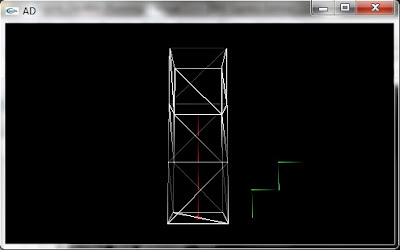
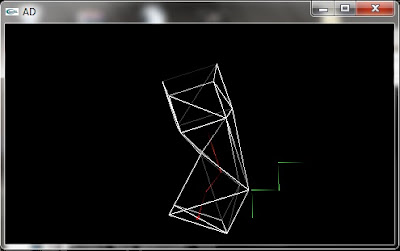
So here's a couple of quick, and rather unspectacular, screenshots. Now I think I need to replace the linear interpolation of the matrices with a spherical linear interpolation, perhaps replace some of the 4x4 matrices with 3x3 for efficiency, then finish implementing the system in the actual animation pipeline. Then of course figure out how to get actual model bone and animation data out of blender and into my engine (either write custom exporters in Blender, which requires learning python, or writing an importer or converting from some other format - which I actually expect to be just as hard of not more so), which of course I can't do until I figure out animation and skinning in Blender... ugh, this is going to take forever, and those Warhammer armies aren't going to paint themselves either.
I spent a good bit of time trying to get the animation system to deform meshes correctly, but I just couldn't quite get it to work and I couldn't figure out why. So I stopped working on it for a good long while. Now when I get into something, I really get into it - for a while. It may take months, but eventually I cool down and my enthusiasm dies. From the moment I came up with my current game dev plans I knew that once my obsession cooled I would stop working on the game, so I worked as hard as I could while the idea was still fresh, hoping that the progress I was making would sustain me. And it did, for a while. But eventually work, video games and Warhammer just pushed the project to the back of my mind.
So I've barely touched the code over a month. I wrote a bit a couple of weeks back, but then I undid all my changes and reverted to what was then month-old code. But it still gave me a better idea of how to solve the problem, and every once in a while I would spare a little thought to the issues I was having. And then today I finally sat down and in under two hours I re-wrote a good deal of the animation code and fixed all the problems. Under two hours. Days of coding in circles, six weeks of avoiding the problem, then two hours to fix it. In a way it's amazing when it happens, but on the other hand it makes you wonder what you were doing wrong the rest of the time.
Anyway, my mistake was that I was not applying bone length correctly, this wasn't a problem sometimes but it screwed up the inverse bind matrix, which made the problem hard to spot. I also removed the bone offset (this can be replaced by intermediate bones, it may be less efficient in some cases but typically the offset is not used so this is slightly more efficient for most rigs), but now that I've figured out the way the bone length is applied I beleive I can easily put the offset back in later if I decide I want it back.
So here's a couple of quick, and rather unspectacular, screenshots. Now I think I need to replace the linear interpolation of the matrices with a spherical linear interpolation, perhaps replace some of the 4x4 matrices with 3x3 for efficiency, then finish implementing the system in the actual animation pipeline. Then of course figure out how to get actual model bone and animation data out of blender and into my engine (either write custom exporters in Blender, which requires learning python, or writing an importer or converting from some other format - which I actually expect to be just as hard of not more so), which of course I can't do until I figure out animation and skinning in Blender... ugh, this is going to take forever, and those Warhammer armies aren't going to paint themselves either.


Sunday, January 17, 2010
I can't believe this hasn't been done yet!
OK, so I was thinking about an old episode of the Justice League cartoon, where Superman and Wonder Woman are trying to recover an ancient artifact that is part of the key to Hades because... you know what? Never mind. The point is, the artifact is protected by a curse that makes each one see the other as a demon, so they start fighting. There's a similar idea in an old episode of the Street Fighter animated series (I believe it predates the Justice League episode) where Ryu and Ken enter a cave which makes each see the other as a living statue, and of course they fight each other. For a better idea of what I mean, check out the Contract - the Cretcher cyborg is a perfect example.
So then I thought: bloody hell, why can't you do that in a game? Basically, a split-screen game where each player sees the same terrain and other players in a completely different way. Picture: you're running down a steel corridor in a high-tech cyborg part production factory, and you run into a combat cyborg with a chainsaw for a hand. You raise your machine-gun and take aim... meanwhile, your friend is exploring an ancient and cursed castle, when he rounds a corner and comes face to face with a hideous demon, all fire and brimstone. As the creature takes a deep breath and prepares to spew demonic fire at his face, he raises his sword and prepares to attack... cool enough online, but even better in split screen where you can see yourself through your opponent's eyes.
I believe there is something a little similar in Demon's Souls, where online players appear as ghosts or something (never played it), but you still see the same landscape. Of course games like Area 51 and Haze, which had special vision modes, allowed people to get different views, but that's not quite the same as entirely different realities that overlap.
Clearly this is related to my existing plan for the "spirit world" in which you see different things overlapping, but in this case the focus is not on you seeing different views, but rather on different people seeing the same thing in different ways (I'm sure there's a metaphor for life in there somewhere...).
I'm actually thinking a third person game would work better for this, so in split screen you can step alongside your friend and see the same scene (including your characters) and see the differences. Using headsets or when online you could even hear different sounds - imagine you talk to your friend online and the sound of you voice is modified to make you sound like a robot, while he sounds like a monster or ghost. Every player could decide separately what they are - robot, samurai, space marine, knight, cop etc. and the whole world and everything in it reflects that reality, perhaps you would never know what they were seeing. This could have game play implications if characters of different "realities" had different stats and abilities - for example, a knight or samurai has a 1-hit-kill melee attack but only very slow firing projectile weapons, so the decision about whether to close in or firefight from a distance is critical. Alternately, you could see everything as it would be in your reality except human players, who would appear to you as they see themselves, creating some interesting visual scenarios. For example picture a co-op game where you're a space marine battling aliens alongside a samurai.
Now I realise that there are serious issues with the idea, namely loading two completely separate sets of textures and models for everything (even animations and perhaps even sounds) will damn near double the memory requirements, so everything will have to be downsized to compensate for that. But the fact is there's plenty of stylized games which don't push system limits yet are still enjoyable and visually pleasing. Portal wasn't graphically amazing, but the graphics were perfectly suitable for the setting and it was a great game. When playing online there won't be any problem at all of course.
So the question now is, is it worth trying to actually do something with this idea? Of course I can't be too ambitious, but if it seems feasable later on in the project I would like to try.
So then I thought: bloody hell, why can't you do that in a game? Basically, a split-screen game where each player sees the same terrain and other players in a completely different way. Picture: you're running down a steel corridor in a high-tech cyborg part production factory, and you run into a combat cyborg with a chainsaw for a hand. You raise your machine-gun and take aim... meanwhile, your friend is exploring an ancient and cursed castle, when he rounds a corner and comes face to face with a hideous demon, all fire and brimstone. As the creature takes a deep breath and prepares to spew demonic fire at his face, he raises his sword and prepares to attack... cool enough online, but even better in split screen where you can see yourself through your opponent's eyes.
I believe there is something a little similar in Demon's Souls, where online players appear as ghosts or something (never played it), but you still see the same landscape. Of course games like Area 51 and Haze, which had special vision modes, allowed people to get different views, but that's not quite the same as entirely different realities that overlap.
Clearly this is related to my existing plan for the "spirit world" in which you see different things overlapping, but in this case the focus is not on you seeing different views, but rather on different people seeing the same thing in different ways (I'm sure there's a metaphor for life in there somewhere...).
I'm actually thinking a third person game would work better for this, so in split screen you can step alongside your friend and see the same scene (including your characters) and see the differences. Using headsets or when online you could even hear different sounds - imagine you talk to your friend online and the sound of you voice is modified to make you sound like a robot, while he sounds like a monster or ghost. Every player could decide separately what they are - robot, samurai, space marine, knight, cop etc. and the whole world and everything in it reflects that reality, perhaps you would never know what they were seeing. This could have game play implications if characters of different "realities" had different stats and abilities - for example, a knight or samurai has a 1-hit-kill melee attack but only very slow firing projectile weapons, so the decision about whether to close in or firefight from a distance is critical. Alternately, you could see everything as it would be in your reality except human players, who would appear to you as they see themselves, creating some interesting visual scenarios. For example picture a co-op game where you're a space marine battling aliens alongside a samurai.
Now I realise that there are serious issues with the idea, namely loading two completely separate sets of textures and models for everything (even animations and perhaps even sounds) will damn near double the memory requirements, so everything will have to be downsized to compensate for that. But the fact is there's plenty of stylized games which don't push system limits yet are still enjoyable and visually pleasing. Portal wasn't graphically amazing, but the graphics were perfectly suitable for the setting and it was a great game. When playing online there won't be any problem at all of course.
So the question now is, is it worth trying to actually do something with this idea? Of course I can't be too ambitious, but if it seems feasable later on in the project I would like to try.
Subscribe to:
Posts (Atom)